

How to track law firm SEO performance is one of the most common frustrations law firm owners have with SEO, as they do not know whether it’s working.
Their agency sends monthly reports full of graphs and tables — but does any of it connect to actual clients? Is the $3,000/month investment generating business?

Without the right tracking setup, you’re flying blind. With it, you can make informed decisions about where to invest, what’s working, and what needs to change.
This guide walks you through exactly how to track SEO performance for your law firm — the tools, the metrics that actually matter, and how to connect search rankings to signed cases.
The Two Core Principles of Law Firm SEO Tracking
Before we get into specific tools and metrics, two principles that should guide everything:
Principle 1: Measure outcomes, not just activity. Rankings are activity. Leads are outcomes. Signed clients are the ultimate outcome. Good SEO tracking connects all three: you should be able to trace a signed client back to the specific search query that first brought them to your website.
Principle 2: Track trends, not snapshots. A single month’s data means almost nothing. What matters is the trend over 3–6–12 months. Traffic up 40% year-over-year is meaningful. One good month isn’t.

The Essential Tool Stack for Law Firm SEO Tracking
You don’t need expensive tools to track your SEO performance effectively. This stack covers everything a law firm needs:
1. Google Search Console (Free — Required for How to Track Law Firm SEO Performance)
Google Search Console (GSC) is the single most important SEO tool you have.
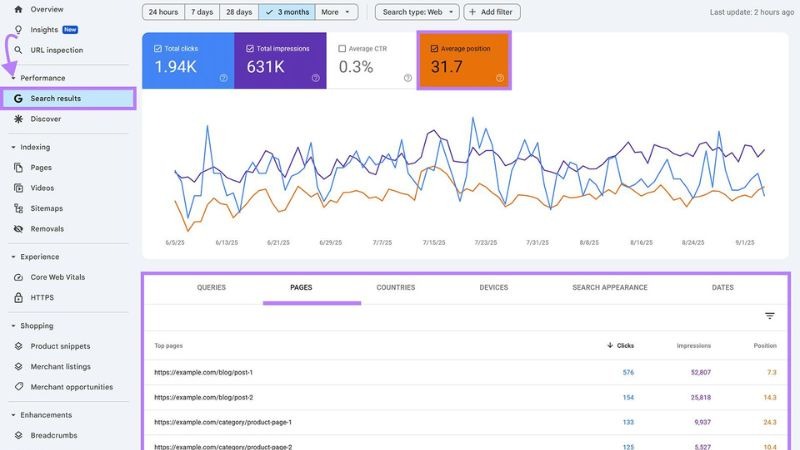
It shows you exactly what’s happening between Google and your website.
What it shows you:
- Which search queries are bringing people to your site (and how many clicks and impressions each generates)
- Which pages receive the most search traffic
- Your average position for different keywords
- Any technical issues Google has found with your site (crawl errors, indexing problems, manual penalties)
- Core Web Vitals performance
How to use it for law firm SEO tracking:
Monthly review: Performance report
- Go to Search Console → Performance → Search Results
- Set the date range to the last 3 months (or compare to the same period last year)
- Check Total Clicks and Total Impressions — are they trending up?
- Click “Queries” tab — which search terms are bringing people to your site? Are your target keywords in this list?
- Click “Pages” tab — which pages are getting the most organic traffic?
What to look for:
- Your primary practice area keywords should be showing increasing impressions and clicks over time
- If you see high impressions but low clicks for a keyword, your title tag or meta description may need improvement
- Pages with declining impressions may be losing rankings and need attention
2. Google Analytics 4 (Free — Required)
While Search Console shows you search engine data, Google Analytics 4 (GA4) shows you what happens after people arrive at your site — and critically, whether they convert into leads.
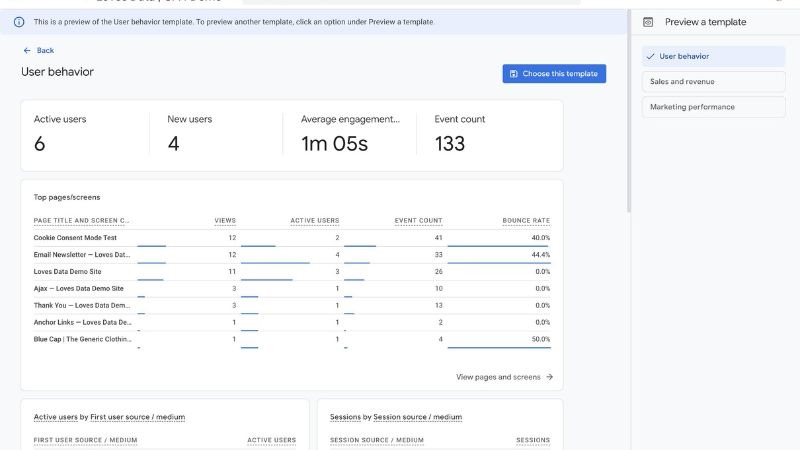
Key setup for law firms: Before you can track conversions, you need to set up conversion events in GA4. For a law firm, set up tracking for:
- Form submissions (contact form completions)
- Phone number clicks (if your phone number is a click-to-call link)
- Live chat initiations
- Consultation booking completions
Without conversion tracking set up, GA4 shows you traffic data but can’t tell you whether that traffic is generating leads.
What to track monthly in GA4:
Organic traffic trend: Reports → Acquisition → Traffic Acquisition → Filter by “Organic Search” Monitor month-over-month and year-over-year trends in sessions from organic search.
Organic conversions: After setting up conversion events, you can see how many leads each traffic channel generates. Under Acquisition, filter by Organic Search and look at conversion counts and conversion rate.
Top organic landing pages: Which pages are generating the most organic traffic? Are those pages also converting visitors? High-traffic pages with low conversion rates may need CTA improvements.
3. Google Business Profile Insights (Free — Required for Local)
Your Google Business Profile has its own analytics dashboard that tracks performance in local search and Google Maps.
What it shows:
- How many people searched for your firm by name vs. discovered you in category/keyword searches
- How many people called your firm directly from your GBP listing
- How many people requested directions to your office
- How many people visited your website from your GBP
- Which photos get the most views
- How your listing performs vs. competitors (visible in the competitive benchmarking section)
How to access: Search your firm name in Google → click your knowledge panel → scroll to “Your Business on Google” → click “See your profile performance.”
What to track monthly:
- Total calls from GBP (this is pure, directly attributable leads)
- Profile views trend
- Search type breakdown (direct vs. discovery vs. branded)
A growing number of searches from “Discovery” (people finding you by searching keywords rather than your firm name) indicates improving local SEO performance.
4. A Rank Tracking Tool (Paid — Recommended)
Google Search Console shows you average position, but it’s not great for tracking specific keyword rankings over time. A dedicated rank tracker gives you cleaner data.
Recommended tools:
- Semrush (119–449/month): Full-featured; excellent for competitor analysis and keyword tracking
- Ahrefs (99–399/month): Best-in-class backlink data; strong rank tracking
- BrightLocal (29–79/month): Specifically built for local SEO tracking; excellent for law firms that primarily care about local rankings
What to track: Set up rank tracking for your 10–20 most important keywords:
- Your primary practice area + city combinations
- Specialty case type keywords
- Informational keywords for which you’ve published content
Review rankings monthly. Don’t panic over weekly fluctuations — watch the trend.
5. Call Tracking (Paid — Highly Recommended)
This is where many law firms leave money on the table. Without call tracking, you can see that organic traffic is up, but you can’t prove that the phone is ringing more because of SEO.
Call tracking software assigns unique phone numbers to different traffic sources.

When someone calls the number they found on your organic search result, the software logs that as an organic search conversion.
Recommended tools:
- CallRail (45–145/month): The industry standard; integrates with GA4 and most CRMs
- WhatConverts (30–100/month): Strong lead management features
What to set up:
- One dynamic tracking number for organic search traffic
- One dynamic tracking number for Google Ads (if running ads)
- One dynamic tracking number for your Google Business Profile
This lets you directly compare lead volume from each channel — including SEO — and attribute revenue accordingly.
The Metrics That Actually Matter for Law Firm SEO
Now that you have the right tools, here are the metrics to focus on:
Tier 1: Business Outcomes (Review Monthly)
Organic leads generated: Total form submissions + phone calls + chat initiations attributed to organic search. This is your primary success metric.
Cost per organic lead: Monthly SEO investment ÷ organic leads generated. Compare this to your Google Ads cost per lead. As SEO matures, this number should improve.
Organic lead quality: Are organic leads converting to consultations? Are consultations converting to retained clients? Track conversion rates through your intake process to understand lead quality, not just volume.
Tier 2: Traffic and Visibility (Review Monthly)
Organic sessions: Monthly sessions from organic search. Track month-over-month and year-over-year.
Google Business Profile calls and visits: Direct measure of local SEO performance.
Organic conversion rate: What percentage of organic visitors take a desired action (form fill, call, chat)? Industry average for law firms is roughly 2–5%. If yours is lower, conversion optimization (not more SEO) may be the priority.
Tier 3: Search Performance (Review Monthly)
Target keyword rankings: Positions for your 10–20 priority keywords. Are they trending up?
Total clicks from GSC: Total clicks from all organic searches. Trending up means growing visibility.
Map pack visibility: Are you appearing in the local 3-pack for your primary practice area keywords? Tools like BrightLocal can track this.
Metrics to Mostly Ignore
Impressions without clicks: High impressions for keywords you’re not ranking in the top 5–10 for are essentially invisible to searchers. Impressions only matter when they lead to clicks.
Domain authority (DA/DR): These are third-party metrics invented by SEO tool companies. Google doesn’t use them. They can be useful as rough comparative benchmarks, but don’t obsess over increasing your DA number.
Total keywords ranking: Ranking for 500 keywords is meaningless if none of them have search volume. Focus on rankings for keywords with real volume.
Bounce rate (in isolation): A high “bounce rate” in GA4 doesn’t automatically mean your site is performing poorly. Someone who finds your phone number and calls immediately will show as a “bounce” — but that’s a conversion. Look at engagement rate and conversions together, not just bounce rate.
Setting Up a Monthly SEO Review Process
Establish a simple monthly routine:
First week of the month:
- Pull Google Search Console: clicks and impressions vs. last month and last year. Note any major changes.
- Check GSC for new technical errors or coverage issues.
- Pull GA4 organic traffic and conversion data.
- Pull GBP insights: calls, direction requests, profile views.
Mid-month:
- Review rank tracking report. Note any significant ranking changes (up or down).
- Check call tracking data: how many organic calls this month vs. last month?
End of month:
- Compile a simple one-page summary: organic leads, organic traffic, top-ranking keywords, notable changes.
- Identify one or two areas to focus on in the next month.
This monthly process takes 1–2 hours once your tools are set up. It keeps you informed, helps you hold your SEO agency accountable, and lets you make data-driven decisions.
Red Flags in Agency Reporting
If you’re working with an SEO agency, watch out for reports that:
- Show only keyword rankings without traffic or lead data
- Report on keywords you’ve never discussed as priorities
- Show “traffic” without clarifying that it’s organic traffic (vs. all sources)
- Never mention conversions or leads
- Are full of graphs but light on written analysis or recommendations
- Change the keywords they report on month to month (potentially hiding declining rankings)
A good monthly report should clearly show: what changed, why it changed, and what is being done next month as a result.
The Bottom Line
Tracking law firm SEO performance isn’t complicated, but it does require the right setup and a consistent monthly process. The goal is simple: connect every dollar of SEO investment to business outcomes — leads, consultations, and retained clients.
With Google Search Console, GA4, GBP Insights, call tracking, and a rank tracker in place, you’ll have everything you need to know whether your SEO is working — and where to focus to make it work better.
If you’re working with LawGetSEO, this tracking infrastructure is built into your engagement from day one. Learn more about our reporting approach or schedule a free consultation.
LawGetSEO works exclusively with law firms. Our reporting connects SEO activity directly to leads and revenue — not just rankings. See how we work.