

On-page SEO for lawyers is the foundation of a high-performing legal website. You can build backlinks, publish content, and optimize your Google Business Profile, but if your law firm’s website has fundamental on-page and technical issues, none of that off-site work will reach its full potential.

On-page SEO is the foundation on which everything else is built. This checklist covers every element that needs to be optimized on each page of your law firm’s website, as well as the technical factors that affect your entire site.
Bookmark this and use it as your reference guide.

Part 1: Keyword Strategy Fundamentals
Before optimizing any page, you need to know what it should rank for.
Keyword Mapping
Every page on your site should target one primary keyword and a handful of closely related secondary keywords. This is called keyword mapping, and it prevents your own pages from competing against each other (keyword cannibalization).

How to map keywords to pages:
- Homepage: Your broadest, highest-authority keyword (e.g., “personal injury lawyer [city]” or “law firm SEO services”)
- Practice area pages: One page per practice area, each targeting its own keyword cluster
- Location pages: One page per city/location you serve
- Blog posts: Informational and long-tail keywords
Finding the right keywords for law firm pages: Start with the core formula: [Practice Area] + [Legal Term] + [Location]
Examples:
- “car accident lawyer Houston TX”
- “criminal defense attorney Chicago”
- “estate planning lawyer near me”
- “family law attorney San Diego”
Then add variations:
- “car accident attorney” (synonym for lawyer)
- “auto accident lawyer” (synonym for car accident)
- “best car accident lawyer Houston” (qualifier)
- “car accident law firm Houston” (entity variation)
Target all these variations within the same page rather than creating separate pages for each — Google’s natural language processing understands synonyms and related terms.
Part 2: On-Page Optimization Checklist
For every key page on your law firm’s website, run through this checklist:

Title Tag Optimization for On-Page SEO for Lawyers ✓
The title tag is what appears as the blue clickable headline in Google search results. It’s one of the strongest on-page ranking signals.
Requirements:
- Include the primary keyword (exact match or very close variation)
- Include your city/location for local pages
- Include your firm name (typically at the end)
- 50–60 characters maximum (longer gets truncated in search results)
- Compelling and click-worthy — don’t just stuff keywords
Examples:
- ✅ “Personal Injury Lawyer Houston | Smith Law Firm”
- ✅ “Car Accident Attorney Dallas, TX | Free Consultation.”
- ❌ “Personal Injury Lawyer | Car Accident Lawyer | Auto Accident Attorney Dallas Texas” (keyword stuffing)
Meta Description ✓
The meta description is the grey text below the title tag in search results. It doesn’t directly affect rankings but heavily influences click-through rate.
Requirements:
- 150–160 characters maximum
- Include the primary keyword naturally
- Include a compelling reason to click (free consultation, X years experience, etc.)
- Each page must have a unique meta description — never use the same one across multiple pages
- Write it like ad copy: clear benefit + call to action
Example: “Injured in a car accident? Our Houston personal injury lawyers have recovered $50M+ for clients. Free consultation. Call 24/7.”
H1 Heading ✓
The H1 is the main visible headline on the page.
Requirements:
- Exactly one H1 per page (not zero, not two)
- Include the primary keyword
- Match or be closely related to the title tag
- Unique across all pages on the site
H2 and H3 Subheadings ✓
Subheadings structure your content and signal topic coverage to Google.
Requirements:
- Use H2s for major sections of the page
- Use H3s for subsections within H2 sections
- Include secondary keywords and related terms in subheadings where natural
- Subheadings should help the reader navigate — don’t stuff keywords artificially
URL Structure ✓
- URL includes the primary keyword (e.g., /personal-injury-lawyer-houston/)
- URL uses hyphens between words (not underscores)
- URL is short and descriptive — avoid long strings of numbers or parameters
- URL is lowercase
- Location-specific pages include the location in the URL
Content Quality and Length ✓
Content quality is where you win or lose for competitive keywords.
Requirements:
- Primary keyword appears in the first 100 words of body content
- Primary keyword density is natural — not forced or repetitive (roughly 1–2% is fine)
- Secondary and related keywords are used throughout
- Content fully covers the topic — ask yourself: what does a visitor need to know?
- Minimum 800 words for competitive pages; 1,500+ for highly competitive terms
- Written with genuine legal expertise, not generic filler
- Content is unique — not duplicated from other pages or competitors
Internal Linking ✓
Internal links distribute page authority across your site and help users navigate.
Requirements:
- Each page links to at least 2–3 relevant pages on your site
- Use descriptive, keyword-rich anchor text (not “click here”)
- Your most important pages (practice area pages, homepage) receive links from many other pages
- New blog posts link to relevant service pages
Images ✓
- All images have descriptive alt text that includes relevant keywords where appropriate
- Images are compressed to minimize file size (use WebP format)
- File names are descriptive (e.g., “houston-personal-injury-lawyer.webp” not “IMG_1234.jpg”)
- Large or hero images use lazy loading
Call to Action ✓
Every page should drive visitors toward a specific next action.
- A clear CTA is visible without scrolling (“above the fold”) on every page
- The contact form or the click-to-call phone number is easy to find
- CTA text is specific: “Get a Free Case Evaluation” beats “Contact Us.”
- For service pages: the CTA directly relates to the service (e.g., “Speak with a Personal Injury Lawyer Today”)
Part 3: Schema Markup for Law Firms
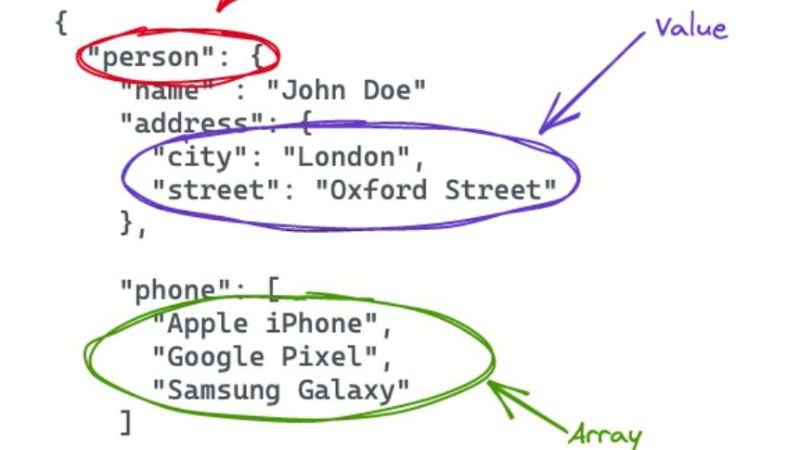
Schema markup (structured data) is code added to your HTML that helps Google understand your content. It can earn you rich results in search — enhanced listings with star ratings, FAQs, or other features.
LegalService Schema ✓
Add this to all practice areas and service pages.
Required fields:
- @type: LegalService (or Attorney)
- name: Your firm name
- description: Brief description of the service
- url: Page URL
- telephone: Your phone number
- address: Full address (with PostalAddress type)
- areaServed: Geographic areas served
- priceRange: Optional but useful
Attorney Schema ✓
Add to individual attorney profile pages.
Required fields:
- @type: Person
- name: Attorney’s full name
- jobTitle: “Attorney” or specific title
- url: Profile page URL
- worksFor: Your firm (with Organization type)
- alumniOf: Law school
- memberOf: Bar associations
FAQ Schema ✓
Add to any page with a Q&A section. This can earn FAQ rich results in Google search.
- Each question is a unique question that visitors actually ask
- Answers are complete and genuinely useful
- Questions and answers appear visibly in the page content (not hidden)
Review Schema ✓
Add to pages featuring client testimonials.
- Only use for genuine reviews — never fabricated
- Include reviewer name, review text, and star rating
- Reviews must be visible on the page
BreadcrumbList Schema ✓
Add to all pages to help Google understand your site structure.
Example: Home > Personal Injury > Car Accident Lawyer Houston
Part 4: Technical SEO Checklist
These factors affect your entire site, not just individual pages.
Site Speed and Core Web Vitals ✓

Google’s Core Web Vitals are actual ranking factors for mobile search.
LCP (Largest Contentful Paint) — target: under 2.5 seconds
- Optimize hero images (compress, use WebP, add width/height attributes)
- Use a content delivery network (CDN)
- Minimize render-blocking resources
FID/INP (Interaction to Next Paint) — target: under 200ms
- Minimize heavy JavaScript execution
- Break up long tasks
- Use browser caching
CLS (Cumulative Layout Shift) — target: under 0.1
- Set explicit dimensions for images and video embeds
- Avoid inserting content above existing content after load
How to test: Use Google PageSpeed Insights, Google Search Console’s Core Web Vitals report, or GTmetrix.
Mobile Optimization ✓
- Site passes Google’s Mobile-Friendly Test
- Text is readable without zooming (minimum 16px font size)
- Tap targets (buttons, links) are at least 48x48px
- No horizontal scrolling on mobile
- Phone numbers are formatted as click-to-call links
- Forms work perfectly on mobile keyboards
HTTPS and Security ✓
- Site uses HTTPS (SSL certificate installed and active)
- No mixed content warnings (all resources loaded over HTTPS)
- HTTP URLs redirect to HTTPS equivalents
Crawlability and Indexability ✓
- The XML sitemap exists at /sitemap.xml and is submitted to Google Search Console
- The robots.txt file is not accidentally blocking important pages
- No important pages are set to “noindex.”
- Canonical tags are correctly set — especially on pages with similar content
- No broken links (404 errors) on key pages
Duplicate Content ✓
Law firm sites are particularly prone to duplicate content issues (e.g., multiple city pages with nearly identical content).
- Each page has fully unique content — not just city name swapped
- Canonical tags are used where pages are intentionally similar
- No www vs. non-www duplication (site should redirect one to the other)
- Pagination is handled correctly if applicable
Site Architecture ✓
- Every important page is reachable within 3 clicks from the homepage
- The navigation menu includes all major practice areas
- Breadcrumb navigation is enabled
- There are no “orphan pages” — pages with no internal links pointing to them
Google Search Console Setup ✓
If you haven’t done this, do it today. It’s free.
- Site is verified in Google Search Console
- The XML sitemap is submitted
- Any manual actions or penalties are reviewed and addressed
- Search Console is checked monthly for crawl errors, coverage issues, and performance data
Part 5: Local On-Page Signals
These apply specifically to local SEO for law firms.
NAP Consistency ✓
- Your firm’s Name, Address, and Phone number appear exactly the same on your website as on your Google Business Profile and all directory listings
- NAP is in the footer of every page
- Address is marked up with LocalBusiness schema
Embed a Google Map ✓
- The Google Maps embed appears on your contact page, showing your office location
- If you have multiple offices, each location page has its own map embed
Location-Specific Content ✓
- Each location page mentions local courts, landmarks, or geographic features
- Content references local-specific legal considerations where relevant (state laws, local courts)
- Location pages include the specific city/region in the title, H1, and throughout content
Using This Checklist
The most effective way to use this checklist:
- Run it on your homepage first — this is your highest-priority page
- Then your primary practice area pages — these are where most of your leads come from
- Then, location pages — these capture local search traffic
- Then, new content before publishing — make it a part of your publishing process
Not every element will have the same impact on every site. If you’ve never installed schema markup, that’s likely to have a more immediate impact than tweaking a title tag that’s already well written.
If you’d like a professional on-page and technical audit of your law firm’s website, contact LawGetSEO for a free assessment.
LawGetSEO specializes exclusively in SEO for law firms, with deep expertise in technical, on-page, and local optimization for legal websites. Learn about our services.